prestashop 9 theme
Flag Theme, the PrestaShop 9 theme built to sell in Italy
Flag Theme is the PrestaShop 9.1 and 9.2 theme by Flag Agency, a web agency in Frattamaggiore (Naples, Italy): more advanced than PrestaShop’s standard theme, with 169 exclusive features and the cookie banner and withdrawal button built in. It costs €499 + VAT.
Price: €499 + VAT
€608.78 incl. VAT · one-off
PrestaShop 9.1–9.2 · 169 exclusive features · 24 modules included · 452 automated tests
already in the theme
Already in the theme: compliant cookies and a withdrawal button
Flag Theme comes with the two features every online shop now needs: a cookie banner that follows the Italian Data Protection Authority’s guidelines and the online withdrawal button required since 19 June 2026 by Directive (EU) 2023/2673. You don’t have to find and buy them separately.
-
Cookie Consent
Compliant cookie banner
- Equally weighted “Accept all” and “Reject”, preferences by category.
- Consent log with anonymised IPs.
- Cookie policy generated by the module.
- Tracking scripts blocked automatically until consent: this works precisely because of the theme.
-
Online Withdrawal
Mandatory withdrawal button
- “Withdraw from contract here” link in the footer of every page, placed by the theme.
- Two-step withdrawal declaration.
- Email confirmation with date, time and PDF receipt.
- Withdrawal requests managed in the back office.
- Mandatory since 19 June 2026 (Directive (EU) 2023/2673).
One theme instead of many modules
Flag Theme includes 24 modules. We also sell 12 of them on their own, because they also work with other themes: bought one by one they would cost €458 + VAT. In the theme they’re already there, together with the other 12, which only work with Flag Theme.
| Module | Price on its own |
|---|---|
| Smart Sorting | €49 |
| Omnibus Compliance | €29 |
| Cookie Consent | €29 |
| Online Withdrawal | €29 |
| Speed-up | €29 |
| Promo Popups | €29 |
| Product Feeds | €29 |
| Access Hours | €29 |
| B2B Registration | €29 |
| Thumbnail Regenerator | €29 |
| Shop Migrator | €49 |
| Copilota AI | €99 |
| Total if bought separately | €458 + VAT |
don’t miss
What makes Flag Theme different, beyond cookies and withdrawal?
Two things that work on every page: product sorting by importance, with a proprietary Flag algorithm, and a built-in cache that keeps the heaviest parts of the shop light.
-
smart sorting
Products sorted by importance, with a Flag algorithm
- Give products, brands and categories an importance from 1 to 10.
- The ranking also weighs availability and recent sales.
- Out-of-stock items always go to the end.
- Different weights for category pages, brand pages and showcases.
- Automatic recalculation every night.
- The same ranking sorts categories, showcases, alternatives and related products.
Also sold on its own: Smart Sorting, the module that sorts products automatically
-
cache and performance
Built-in cache for the heavy parts
- Menus, blocks, lists, cards and features calculated once and reused.
- Data for all cards is calculated together: long lists don’t slow down.
- CSS for each page within 35 KB compressed, theme JavaScript about 27 KB.
- Module CSS and JavaScript only on the pages that use them.
Performance page in the back office
- One-click fixes you can always undo.
- Plain-language diagnosis: debug mode, PHP and OPcache, compression, images, modules, database.
- Response times for home, category, product and CMS pages, with a before-and-after history.
Also sold on its own: Speed-up, the module to speed up PrestaShop
See the speed test figures
product page
What’s on a Flag Theme product page?
A page designed to sell and to clear up doubts: customer questions and answers, “Complete your purchase” with accessories in one click, alternatives when the product is out of stock and all the information the law requires.
-
questions and answers
Customers ask, you answer under the product
Questions come in from the product page, even without JavaScript. You answer from the back office as Seller or Technician, with the date; you show or hide each question.
- “Helpful” votes, search and “Show more”.
- Emails to the seller and the customer.
- Spam protection.
-
complete your purchase
Product and accessories in the cart with one button
The product and its compatible accessories appear with a checkbox and the total: the customer chooses and adds everything at once.
- Total updated as you tick.
- Only items in stock.
- Works even without JavaScript.
And on the same page
- Accessories compatible with the chosen variant (“Compatible with version S, Black”)
- Alternatives when the product is out of stock
- Linked products as buttons: different power ratings or sizes, with price and availability
- Downloadable documents with type, language and format
- EPREL number with a link to the EU database
- Informative instalments, with instalments, interest rate and APR
- Lowest price of the last 30 days (Omnibus)
- Sticky buy bar as you scroll
- Bar to jump between description, specs, documents and questions
- Specification table split into groups
- Related products by category, brand and price range
- Incentives with requirements and verification date
what’s new
What’s new in Flag Theme?
Seven new features, to sell more and to help whoever runs the shop: the estimated delivery date, promo popups, linked products shown as variants, video in the gallery, product feeds for Google and social media, the WhatsApp button and Copilota AI, which tells you what to do in your shop today.
-
estimated delivery
The delivery date, before the customer asks
“Order within 2 h 15 min and receive it between Wed 7 and Fri 9 October”: on the product page, in cards, in the cart and for each carrier at checkout. The calculation takes into account the cut-off time, Italian public holidays (Easter included), closures and per-product delays.
-
promo popups
Popups with a discount code and newsletter, without being a nuisance
A discount code to copy, newsletter sign-up with a welcome voucher and a countdown. One popup per page, never over the cookie banner; on smartphones it opens as a bottom panel.
Also sold on its own: Promo Popups, the module for popups with discount codes and newsletter sign-up
-
linked products
Different products shown as variants
Each product keeps its own page and stock, but on the product page it appears as a variant: as thumbnails, for the same model in several colours, or as buttons with price and availability, for different power ratings or sizes. Up to 5 groups per product, also from a CSV file.
-
video
Video in the product gallery
The video sits in second position in the gallery, with a play symbol on the thumbnail. It loads only when needed, muted, and never if the customer has turned on “reduce motion” or data saver.
-
copilota ai
Copilota AI, for whoever runs the shop
Shop health scores, “What to do today” ranked by impact and 33 automatic analyses calculated from your data. With AI it writes the missing SEO texts, published only if you approve them, and answers your questions about the data, with customer data masked.
The AI features need an Anthropic (Claude) key: usage is billed separately, with a monthly budget.
Also sold on its own: Copilota AI, the PrestaShop AI module for shop owners
-
product feeds
Your catalogue on Google Shopping, Meta and TikTok
Feeds for Google Merchant Center, Meta (Facebook and Instagram), Pinterest, TikTok and Trovaprezzi, updated automatically and generated in batches without slowing the shop down. If a product is rejected, the diagnostics tell you why, in plain language.
Also sold on its own: Product Feeds, the module for Google Shopping, Meta, TikTok and Trovaprezzi feeds
-
whatsapp button
WhatsApp in one tap, with the product already in the message
Customers write to you with a ready-made message that mentions the product they’re looking at. Up to 3 contacts, such as Sales and Support, and opening hours: outside them the button hides or shows a notice. No WhatsApp script, so no cookie consent to ask for.
all features
What are Flag Theme’s exclusive features?
Flag Theme has 169 exclusive features, grouped into the shop’s 8 areas: from design to checkout, from legal requirements to marketing and running the shop. On top of that you get 835 settings you change from the back office, without touching code. Open a group to see the full list.
Design and navigation 13 features
Header and menu
- Top bar with service messages (free shipping, support), sticky and readable on smartphones too
- Three-row header (bar, logo with search and cart, menu), with a compact version as you scroll
- Multi-column mega menu that opens on click and works with the keyboard and screen readers
- Layered smartphone menu in its own window
- Heights reserved in advance: the page never “jumps” while loading
Footer
- Five-level footer: newsletter and reassurance, link columns, contacts and social, payment and carrier logos, legal line
- Complete legal line (company name, VAT number, company register number, registered office, share capital), with a back-office warning if a mandatory detail is missing
- Permanent links to “Cookie preferences”, “Withdraw from contract here” and the accessibility statement
Shop appearance
- Colours, fonts and corner rounding chosen from the panel, without touching files
- Buttons and labels only in colour pairs with sufficient contrast
- Fonts served by your own site, with no calls to Google Fonts and a fallback that doesn’t shift the text
- Custom CSS with security checks, saved as a versioned file and cached
- A frame for product photos on white backgrounds, so they no longer blend into the page
Home and content pages 26 features
Home blocks
- Home page built with guided blocks, without heavy page builders
- Full-width or boxed hero, with text over the image
- Featured categories that scroll sideways on smartphones
- Featured brands
- Banners in 1 to 3 columns, in three styles: standard, panel and overlay
- Banner next to a product list
- Product sections alternating with content, also as tabs (New, Best sellers, Offers)
- Reassurance: shipping, returns, secure payments
- Testimonials
- Free HTML, with a library of theme components
- HTML cleaned automatically: no scripts, inline styles or code that slows the page or harms accessibility
- Images without alt text rejected when saving
- Images converted automatically to WebP and AVIF, in several widths
- Preview on desktop, tablet and smartphone, language by language, before publishing
Section-based pages
- About, Services and Contact pages built from sections, keeping the URL, meta tags and sitemap of the PrestaShop page
- Sections for text with image, key figures, values, team, history and timeline, gallery and call to action
- FAQ with structured data for Google and AI assistants
- Contact page with the map loaded only after a click and cookie consent
- Page type declared to Google (About, Contact), with business details consistent with the shop
Promo popups
- Scheduled campaigns with a discount code to copy
- Newsletter sign-up with privacy consent and a welcome voucher
- Countdown to the end of the promotion
- Opens after a few seconds, at a set scroll percentage or when the visitor is about to leave (on desktop)
- Rules by page, device, customer type and frequency, with one campaign per page
- On smartphones, an unobtrusive bottom panel that isn’t penalised by Google and doesn’t cover the cookie banner
- Statistics on views, clicks, copied codes and sign-ups
Catalogue and product pages 49 features
Categories, brands and search
- Filters in a tidy panel: open or closed, search inside the filter, first values and then “See all”
- Filter value order chosen by you (e.g. Monosplit, Dual split, Trial split)
- “Recommended” sorting by importance, availability and sales, with out-of-stock items last
- Different ranking weights for categories, brands and lists, recalculated every night
- Smart H1: if a category or brand description starts with a heading, the theme doesn’t add a second one
- Weekly check of category and brand headings, with a list of the cases to fix
- Brands page in alphabetical order with a letter bar, a “0-9” group and accented names in the right place
- Featured brands, logos on or off, product count and intro text
Product cards
- Cards configurable by category and context (category, home, related, search)
- Rule-based badges by category, brand, feature, price, availability and period
- Automatic “No. 1 best seller” and “Incentives” badges
- Second image on hover
- Attribute row (e.g. “12000 BTU · R32 · Wi-Fi”) and chips with the key features
- Energy class with a link to the EU EPREL label
- Short “Why choose it” text
Product page
- Purchase column next to the gallery, with a sticky buy bar as you scroll
- Bar to jump between sections: description, specs, documents, questions
- Video in the gallery in second position, with a play symbol on the thumbnail
- Video loaded only when needed, muted, and never with “reduce motion” or data saver on
- YouTube and Vimeo videos, also in descriptions, shown as a preview and loaded only after cookie consent
- Specification table split into groups, with key features per category or per product
- Linked products: separate products shown as variants, as thumbnails (the same model in several colours) or as buttons with price and availability (different power ratings or sizes)
- Up to 5 groups of linked products per product page, managed from a dedicated page, from the product page or with a CSV file
- Accessories compatible with the chosen variant
- “Complete your purchase”: product and accessories added to the cart with a single button
- Alternatives when the product is out of stock
- Rule-based related products: category, brand, price range
- Extra sections per product, category or brand
- Downloadable documents with type, language and format
- EPREL number with a link to the EU database
- Incentive notes with requirements, validity and verification date
- Customer questions and answers that work even without JavaScript
- Question moderation with the answerer’s role (Seller or Technician), “Helpful” votes, search and email notifications
- Spam protection on the question form
Prices, instalments and delivery
- Informative “Pay in instalments from X €/month” block for Scalapay, Klarna, PayPal, HeyLight, Alma and finance companies
- Instalments recalculated when quantity or variant changes, hidden if the product is outside the plan’s limits
- Instalment price highlighted (“€50.00 x 20 instalments”), with the full price below
- Instalments and interest adjustable per category and per product
- Interest rate, APR and a representative example given equal prominence, as consumer credit advertising rules require
- For Google, the product price is always the full price
- Lowest price of the last 30 days on discounts (Omnibus), on product pages, cards and structured data
- Progressive reductions, new products, excluded categories and customer groups handled
- Strikethrough price of your choice: full price or Omnibus reference
- Price history importable from an old site, so the 30 days are correct from day one
- Estimated delivery date: “Order within 2 h 15 min and receive it between Wed 7 and Fri 9 October”
- Estimated delivery also on cards, in the cart and for each carrier at checkout
- Italian public holidays calculated automatically (Easter included), closures, long weekends and cut-off time
- Delays per category, brand, product and variant, and made-to-order products
- Estimate test in the back office for any product, date and time
Cart and checkout 13 features
- Redesigned cart and “added to cart” window, with shipping options and discounts
- Checkout Flag: PrestaShop’s checkout made progressive on a single page
- Compatible with PrestaShop 9.2’s official one-page checkout, with the same design and its known bugs fixed
- Checkout chosen from the back office
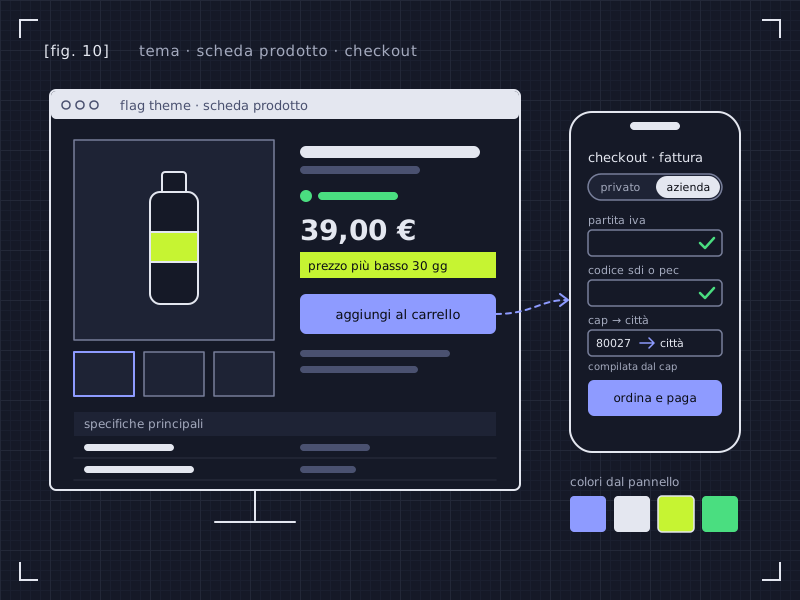
- Italian invoicing: private customers with tax code, companies with VAT number, SDI code or PEC, with format checks
- Billing details saved on the order and visible in the back office
- Paid shipping options (delivery to the floor, by appointment) per carrier, never pre-selected
- Shipping option limits by price, weight and amount
- Form fields cut to what’s needed: sign-up with just email and password, no “Mr/Mrs”
- Guest checkout, with the account created after the order
- Final “Order and pay” button with the total, as the Italian Consumer Code requires
- Terms of sale text configurable per language
- Company (B2B) registration, with business details that pre-fill the billing information
Legal and privacy 24 features
Cookies and consent
- Built-in cookie banner that follows the Italian Data Protection Authority’s guidelines, with no paid third-party platforms
- “Accept” and “Reject” equally prominent; the close X counts as a rejection
- Switches by category (statistics, marketing, preferences), all off by default
- Choice remembered and asked again when the policy changes
- Consent can be withdrawn at any time from the footer
- Consent log with anonymised IPs, exportable and cleaned automatically after 24 months
- Cookie policy generated automatically, with the cookie tables
- Google Consent Mode v2
- Banner shown together with the first content of the page, without slowing down loading
Privacy in forms
- Privacy checkbox on every form of the site: contact, newsletter, stock alerts, reviews, questions, withdrawal, sign-up and customer details, company registration
- Checkbox never pre-ticked and checked by the server too: without it the form won’t go through, even by getting around the browser
- A single clear checkbox at sign-up, instead of two overlapping boxes
- Log of the consents collected, with the texts managed by PrestaShop’s official privacy module
Scripts and tracking
- Codes for Google Analytics 4, Tag Manager, Meta Pixel, Google Ads, Hotjar, Clarity, TikTok, LinkedIn and Pinterest
- Rules by page, device, language and shop
- Prior blocking: scripts run only after consent for the right category
- Script cookies declared automatically in the cookie policy
- Ready-made GA4 e-commerce events: view, cart, checkout, purchase
- Pasted code checked against dangerous or slow code
Online withdrawal
- Online withdrawal function, mandatory since 19 June 2026: permanent footer link, public page and an entry in the customer account
- Withdrawal even without logging in, with order number and email, and protection against repeated attempts
- Partial withdrawal, for some products only
- Immediate email receipt with a PDF signed with a digital fingerprint
- Cases managed in the back office with statuses, customer emails, exclusions and data anonymisation
Marketing and sales channels 12 features
Product feeds
- Feeds for Google Merchant Center, Meta (Facebook and Instagram), Pinterest, TikTok and Trovaprezzi, updated automatically
- Generated in batches without slowing the shop down: 50,000 products in about 12 seconds, resuming on its own if interrupted
- Filters by category, brand, price and availability, with one row per variant where needed
- Exclusion and edit rules, title templates per category and custom labels for campaigns
- Categories matched to Google’s taxonomy, with suggestions and inheritance
- Per-product fixes (exclude, title, GTIN, Google category) right from the product page
- Diagnostics in plain language explaining every rejected product, with a preview and a history of runs
- Data the theme already has reused in the feeds: delivery times, EPREL energy label, videos, features, strikethrough price matching the page
WhatsApp button
- WhatsApp button on the right or left, with a pre-written message for each language and one specific to the product being viewed
- Up to 3 contacts (e.g. Sales, Support) with a small accessible menu
- Opening hours: outside them the button hides or says you’ll reply as soon as possible
- No WhatsApp script loaded, so no cookie consent needed, and clicks counted in Google Analytics
Speed, SEO and accessibility 15 features
Performance
- Page weight kept in check everywhere: CSS under 35 KB compressed, theme JavaScript around 27 KB
- Module CSS and JavaScript loaded only on the pages that use them
- Built-in cache for menus, blocks, lists, cards and features
- “Performance” page with one-click fixes you can always undo
- Plain-language diagnosis of server, PHP, cache, compression, page weight and database
- Response time of the main pages measured, with a “before and after” history
- Check and rebuild of the filter index, which fixes price sorting that shows no products
- Printable report to hand over to the client
SEO and AEO
- Complete structured data: product, variants, offers, breadcrumb, FAQ, organisation, video, shipping
- A single H1 per page and headings always in order
- Content structured to answer the questions of Google and AI assistants
Accessibility
- Everything works with the keyboard, with focus never hidden by sticky bars
- Checked contrast, adequate click targets and respect for “reduce motion”
- Form errors linked to their fields and read out by screen readers
- Automated accessibility tests on all the main pages
Running the shop 17 features
- A single “Theme settings” panel: every feature grouped by area, with the status of each one (on, off, to be configured)
- “Theme modules” panel: switch off the features you don’t use, keep the data, and switch them back on with one click
- Explicit confirmation to switch off legally required modules, and warnings about dependencies between modules
- Client pack: all of a site’s content and settings in one file, importable with a dry run and automatic backup
- AI spending under control: monthly budget, email warning at the threshold and stop at 100%
- Import of questions and answers and of price history from an old site
- Copilota AI for the shop owner: shop health scores and “What to do today” ranked by impact
- 33 automatic analyses of sales, catalogue, SEO and errors, with figures calculated from the shop’s data
- Missing SEO texts (meta tags, alt texts, descriptions) written by AI and published only after your approval
- Questions in Italian about the shop’s data, with customer data masked
- Migration from the old PrestaShop 1.7 keeping the same URLs, with a full restore if something goes wrong
- Thumbnail regeneration in the background and optimisation of oversized photos
Staff access hours (optional)
- Back-office access time slots per profile and per employee, day by day
- Date exceptions (public holidays, overtime) and temporary overrides (“until 10 pm, today only”)
- Access refused outside hours and automatic logout at the end of the slot, with a warning a few minutes before
- Main administrators never locked out, confirmation before restricting your own account, and an emergency command
- Log of refused logins and logouts, exportable, with an optional email alert
How we count: each item is a feature that PrestaShop 9 and its official theme don’t have, or have in a much more limited form. The 835 settings are the options you change from the back office and the client pack, counted one by one: they don’t include text, images or products.
what the theme doesn’t do
- Legal texts (cookies, withdrawal, terms of sale, privacy) must be validated by your lawyer.
- The cookie banner isn’t an IAB TCF certified platform: it’s not suitable for sites showing AdSense ads.
- Instalment blocks are informative: payment stays with the provider’s official module.
comparison
Why is Flag Theme more advanced than the standard PrestaShop theme?
Because it starts from the official PrestaShop 9 theme, Hummingbird, and adds features an Italian shop needs straight away: compliant cookies and withdrawal, invoicing with SDI and PEC, the Omnibus price, sorting by importance, questions and answers and “Complete your purchase”.
Flag Theme is built from Hummingbird 2.0.0: it keeps its base (templates and Bootstrap 5.3) and extends it. It’s a standalone theme, so you don’t need Hummingbird installed.
| Feature | Flag Theme | Hummingbird |
|---|---|---|
| Cookie banner with equally weighted “Accept all” and “Reject” and a consent log | Included | Not included |
| “Withdraw from contract here” button and withdrawal page | Included | Not included |
| Italian invoicing at checkout: tax code, VAT number, SDI or PEC, public bodies | Included | Not included |
| Lowest price of the last 30 days on discounts (Omnibus) | Included | Not included |
| Sorting by importance, with out-of-stock items at the end | Included | Not included |
| Customer questions and answers on the product page | Included | Not included |
| “Complete your purchase”: product and accessories with a single button | Included | Not included |
| Different product cards for each category: attributes, chips, energy class, badges | Included | Not included |
| Product page with accessories per variant, alternatives to out-of-stock items and documents | Included | Not included |
| Informative instalment payment block | Included | Not included |
| Multi-column mega menu that opens on click and works with the keyboard | Included | Not included |
| Tracking scripts with consent and Consent Mode v2 | Included | Not included |
| Registration page for companies and resellers (B2B) | Included | Not included |
| Shop configuration importable from a single file | Included | Not included |
| Estimated delivery date with cut-off time and Italian public holidays | Included | Not included |
| Video in the product page gallery | Included | Not included |
| Linked products shown as variants, as thumbnails or buttons | Included | Not included |
| Brands page in alphabetical order with a letter bar | Included | Not included |
| Promo popups with a discount code and newsletter sign-up | Included | Not included |
| Product feeds for Google, Meta, Pinterest, TikTok and Trovaprezzi | Included | Not included |
| WhatsApp button with a per-product message and opening hours | Included | Not included |
| Shop analyses and SEO texts written with AI, published only if you approve them | Included | Not included |
Comparison checked against the templates of Hummingbird 2.0.0, the version Flag Theme starts from. On Hummingbird, similar features are added with third-party modules that you buy and configure separately. The comparison is about included features, not speed.
speed
How fast is Flag Theme?
In a Lighthouse lab test on the demo, on 2 October 2026, Flag Theme scored 97–98 out of 100 on mobile, with LCP between 2.3 and 2.5 seconds and CLS 0.
| Demo page | Mobile score | LCP | CLS |
|---|---|---|---|
| Home | 98 | 2.38 s | 0 |
| Category | 97 | 2.50 s | 0 |
| Product page | 98 | 2.35 s | 0 |
| Cart | 98 | 2.34 s | 0 |
how we measured
- Lighthouse 12.8.2, simulated mobile profile: Moto G, slow network, CPU slowed down 4×.
- PrestaShop 9.2.0 with the demo catalogue, in a test environment (not on a live site).
- Median of 5 runs for each page: home, category, product page and cart.
This is a lab test on the demo, not a measurement on a real shop: your shop’s speed also depends on hosting, catalogue, images and the modules you add. For the server side, take a look at our PrestaShop hosting.
included modules
Which modules are included in the theme?
Flag Theme includes 24 modules, 19 of our own and 5 agency modules: they install together with the theme and aren’t bought separately (Shop Migrator and Access Hours are in the zip and you turn them on only if you need them). We also sell 12 of them on their own, because they also work with other themes; the others only work with Flag Theme.
Show the 24 included modules
| Module | What it does |
|---|---|
| Flag Theme Studio | The theme’s control panel: colours, fonts, header, footer, legal details, tracking scripts with consent, WhatsApp button, brands page, the “Theme modules” panel and a client pack importable from one file. |
| Smart Blocks | Hero, banners, categories, brands, reassurance and section-based About, Services and Contact pages, with cleaned-up HTML and images converted to WebP and AVIF. |
| Accessible Mega Menu | A multi-column menu that opens on click, works with the keyboard and becomes a layered panel on smartphones. |
| Product Showcases | Product lists anywhere on the pages, also as tabs (New, Best sellers, Offers), with out-of-stock items at the end. |
| Smart Sorting | Sorts products by importance, availability and recent sales, with out-of-stock items at the end. Also sold on its own: Smart Sorting. |
| Spec Sheets and Filters | Features split into groups, key specs per category, a specification table and filters with search, “See all” and custom value order. |
| Smart Product Cards | Different cards for each category: rule-based badges, second image, attribute row, chips, energy class with EPREL link. |
| Product Page Plus | Linked products as thumbnails or buttons (up to 5 groups), accessories per variant, “Complete your purchase”, alternatives to out-of-stock items, documents and EPREL, incentives. |
| Estimated Delivery | Estimated delivery date on product pages, cards, cart and checkout, with cut-off time, Italian public holidays, closures and per-product delays. |
| Instalment Info | An informative “Pay in instalments from X €/month” block on the product page, in cards and in the cart, with the instalments, APR and rates you enter. |
| Omnibus Compliance | The lowest price of the last 30 days on every discount, on the product page, in cards and in structured data. Also sold on its own: Omnibus Compliance. |
| Questions & Answers | Customer questions on the product page, with the seller’s answer and moderation: they work even without JavaScript. |
| Checkout Italia | Italian invoicing with tax code, VAT number, SDI or PEC; paid shipping options; a choice between Checkout Flag and PrestaShop 9.2’s one-page checkout. |
| Cookie Consent | A cookie banner with equally weighted Accept and Reject, preferences by category, a consent log and a generated cookie policy. Also sold on its own: Cookie Consent. |
| Online Withdrawal | The withdrawal button required since 19 June 2026, with email confirmation and a PDF receipt. Also sold on its own: Online Withdrawal. |
| Speed-up | The Performance page: one-click fixes you can always undo, plain-language diagnosis and response times with a before-and-after history. Also sold on its own: Speed-up. |
| Promo Popups | Popups with a discount code, newsletter and countdown, with rules by page, device and customer; they never cover the cookie banner. Also sold on its own: Promo Popups. |
| Product Feeds | Automatically updated feeds for Google Merchant Center, Meta, Pinterest, TikTok and Trovaprezzi, with rules, Google categories and diagnostics that explain every rejected product. Also sold on its own: Product Feeds. |
| Access Hours | Back-office access time slots per profile and per employee, with exceptions, logout at the end of the slot and a log. Optional: enabled only if you need it. Also sold on its own: Access Hours. |
| B2B Registration agency module | A sign-up page for companies and resellers, with VAT number and details that pre-fill the invoice at checkout. Also sold on its own: B2B Registration. |
| Thumbnail Regenerator agency module | Thumbnails regenerated in short background cycles, plus optimisation of oversized original photos. Also sold on its own: Thumbnail Regenerator. |
| Shop Migrator agency module | Moves products, customers, orders and pages from your old PrestaShop 1.7 keeping the same IDs. In the zip, installed only if you need it. Also sold on its own: Shop Migrator. |
| Shop Migrator Connector agency module | A read-only module to install on the old shop, downloadable from Shop Migrator’s back office. |
| Copilota AI agency module | Shop health scores, “What to do today”, 33 automatic analyses, SEO texts written with AI after your approval and questions about your shop’s data. The AI needs an Anthropic key, with usage billed separately. Also sold on its own: Copilota AI. |
accessibility
Is Flag Theme an accessible theme?
It was checked against WCAG 2.2 AA with automated and keyboard tests, and the main problems found were fixed and covered by tests; the screen reader test is still to come.
What you already get in the theme: a skip-to-content link, menu and search that work with the keyboard, focus always visible, checkout errors explained field by field, reduced animation for anyone who turns it off, pages readable even on screens 320 pixels wide. When you change the colours, the theme checks the contrast and warns you in the back office.
The theme helps a lot, but your shop’s accessibility also depends on the copy, images and modules you add. Check your shop’s accessibility for free.
the theme
What is a PrestaShop theme (and what does Flag Theme add)?
A PrestaShop theme is the package that decides how the shop looks and works for the customer: pages, menus, product pages, checkout. Flag Theme starts from the official PrestaShop 9 theme and brings its own modules, with features the standard theme doesn’t have.
Theme or module: what’s the difference?
The theme changes how the whole shop looks and works; a module adds one specific feature, like price history or product sorting. If you only need one feature, take a look at our PrestaShop modules.
how to choose
How do you choose a PrestaShop theme?
Look at four things: compatibility with your PrestaShop version, measured speed, the features you really need without extra modules, and who helps you if something goes wrong. Then check accessibility.
- Compatibility. The theme must state your PrestaShop version. Flag Theme: 9.1 and 9.2, checked with 452 automated tests at every release on PrestaShop 9.2 and 9.1.5.
- Measured speed, with a method. A score without a date and a tool isn’t worth much. Flag Theme: lab test of 2 October 2026, with the method described on this page.
- Features already built in. Every extra module is a cost and one more thing that can break. Flag Theme: cookies, withdrawal, Italian invoicing, Omnibus and sorting are already included.
- Who helps you. Better the people who wrote the theme. Flag Theme is developed by Flag Agency.
- Accessibility. Since 28 June 2025 the European Accessibility Act also applies to many online shops. Flag Theme is checked against WCAG 2.2 AA.
requirements
What are Flag Theme’s requirements?
| Item | Requirement |
|---|---|
| PrestaShop | 9.1 and 9.2 (verified on 9.1.5 and 9.2.0) |
| PHP | 8.1 or later |
| Checkout | “Checkout Flag” or PrestaShop’s one-page checkout (from 9.2), chosen in the back office, always with a final “Order and pay” button showing the total |
| Base | Hummingbird 2.0.0, the official PrestaShop 9 theme (no need to install it) |
| Installation | A single file from the back office: the included modules install themselves |
| Clean code | No changes to the PrestaShop core, no external JavaScript libraries; payments and carriers stay with the providers’ official modules |
| Automated tests | 452, run at every release on PrestaShop 9.2 (with both checkouts) and 9.1.5 |
| Modules included | 24 (19 of our own and 5 agency modules), installed together with the theme (Shop Migrator and Access Hours only if needed) |
| Theme version | 0.9 |
On PrestaShop 1.7? First move your data to a new PrestaShop 9 installation with Shop Migrator, our migration module, which is already in the theme zip.
Need a feature that isn’t there? Take a look at our custom PrestaShop modules.
price
What’s included in the €499 + VAT?
Flag Theme costs €499 + VAT (€608.78 incl. VAT), paid once.
- The theme with its 24 included modules
- Licence for 1 shop
- 12 months of updates
- No subscription: you pay once
- Electronic invoice
Installation isn’t included: if you’d rather not do it yourself, Flag’s PrestaShop support team will take care of it.
complete online shop
Want the theme already installed in a complete online shop?
If you don’t have a shop yet, or want to rebuild it from scratch, Flag Theme can be the starting point of an online shop built by us: project, content, setup and go-live.
See our PrestaShop e-commerce developmentNeed the whole online shop, not just the theme? Estimate the cost with the calculator.
faq
Frequently asked questions about the PrestaShop theme
Does Flag Theme work with PrestaShop 1.7 or 8?
No: Flag Theme is built for PrestaShop 9.1 and 9.2. If you’re on 1.7, first move your products, customers and orders to a new PrestaShop 9 installation with Shop Migrator, which is already in the theme zip, and then set up the theme.
Does Flag Theme include the cookie banner and the withdrawal button?
Yes. Flag Theme includes Cookie Consent, a cookie banner that follows the Italian Data Protection Authority’s guidelines, with a consent log and a generated cookie policy; with the theme it blocks tracking scripts until consent. It also includes Online Withdrawal, the withdrawal button required since 19 June 2026 by Directive (EU) 2023/2673. Sold on their own, they cost €29 + VAT each.
What’s included in the €499 + VAT?
The theme with its 24 included modules, a licence for one shop and 12 months of updates, as a one-off payment: no subscription. Installation isn’t included. The price including Italian VAT is €608.78.
How does Flag Theme sort products?
With a proprietary Flag algorithm: each product gets a score based on the importance from 1 to 10 you give to the product, brand and category, on availability and on recent sales. Out-of-stock items always go to the end and the ranking is recalculated every night. We also sell the same logic on its own: Smart Sorting.
Does Flag Theme have a cache?
Yes, a built-in cache: menus, content blocks, product lists, cards and features are calculated once and reused until you change the data. It doesn’t store the whole page: PrestaShop still generates every page, starting from the parts that are already ready.
What’s special about the product page?
Two things that usually need separate modules: customer questions and answers, moderated by you, and “Complete your purchase”, which adds the product and its accessories to the cart with a single button. Then accessories per variant, alternatives when it’s out of stock, documents and EPREL, informative instalments and a sticky buy bar.
Can I use the modules I already have?
Yes, modules compatible with PrestaShop 9 also work with Flag Theme. Those that change how the shop looks, such as sliders or menus, need checking one by one, because the theme already has its own versions of those features.
Will you install it for me?
Installation isn’t included in the price: you can do it yourself from the back office, like any PrestaShop theme, and the zip also installs and connects the included modules. If you’d rather not do it yourself, Flag’s PrestaShop support can take care of it separately.
What’s the difference between Flag Theme and Hummingbird?
Flag Theme is built from Hummingbird 2.0.0, the official PrestaShop 9 theme, and extends it with 169 exclusive features: compliant cookie banner and withdrawal button, sorting by importance, a built-in cache, questions and answers, “Complete your purchase”, estimated delivery date, invoicing with SDI and PEC and the Omnibus price. You don’t need Hummingbird installed.
Does Flag Theme use artificial intelligence?
Yes, for whoever runs the shop: it includes Copilota AI. The shop health scores, “What to do today” and the 33 automatic analyses work even without AI, because the figures are calculated by the database. To write missing SEO texts and answer your questions about the data it uses Anthropic’s Claude: you need a key, your own or supplied by Flag, and usage is billed separately, with a monthly budget. No text is published without your approval.
Does the theme make my shop legally accessible?
It helps a lot, because it was designed and checked against WCAG 2.2 AA, but on its own it isn’t enough: the copy, images and modules you add count too. To find out where your shop stands, run an accessibility check before changing theme. Check your shop for free.
request the theme
Want Flag Theme on your shop?
Tell us which PrestaShop version you have and where your shop is: we’ll explain how to get it and, if you like, show you a demo.
- We check your PrestaShop version and your shop.
- We write to tell you how to get it and, if you like, show you a demo.
- You decide whether to buy it: no strings attached.
Rather send a message? Message us on WhatsApp (opens WhatsApp)
Got it!
We’ll check your PrestaShop version and write to tell you how to get Flag Theme. We reply within 24 hours.
In a hurry? Message us on WhatsApp.